Why You Should Record Your Lifts (Even If You Never Post Them)
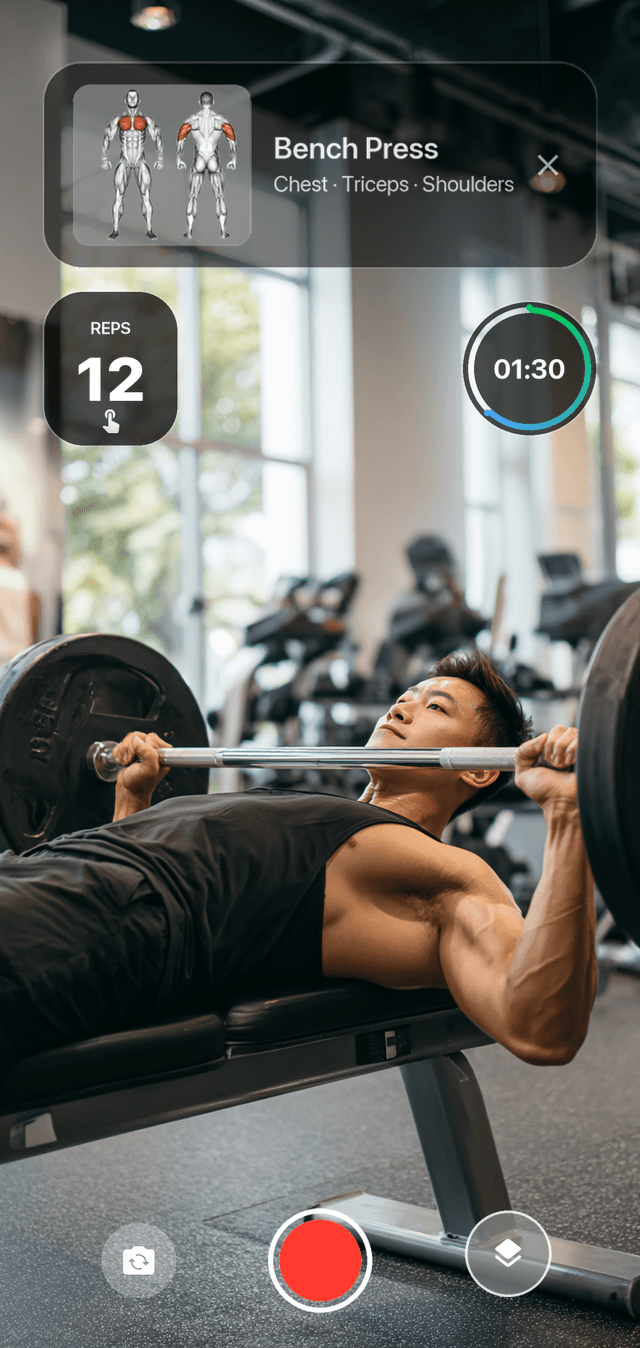
Track this directly in DilFit
DilFit makes logging workout records, monitoring strength metrics, sharing progressive routines, and training alongside partners effortless. Beautiful layouts, custom graphs and full social tracking at your fingertips.
Get App for FreeSay 'record your workout' and most lifters picture an influencer blocking the dumbbell rack with a ring light. Forget that image. The camera in your pocket is one of the most underrated pieces of training equipment you own — and nothing in this article requires posting a single clip, anywhere, ever.
Your form isn't what you think it is
Every lifter carries a mental image of their squat. Almost nobody's matches the footage. Fatigue degrades body awareness precisely when positions matter most — depth creeps up, elbows drift, hips shoot back — and from the inside it all feels normal. Video is the cheapest objective coach available: thirty seconds of review between sets catches the drift your nervous system is hiding from you, on the next set instead of three months after the error becomes a habit.
The log says what happened — video shows how
Your training log says 100 kilos for five last week and 100 for five this week: identical entries. The footage says this week's fifth rep moved faster and cleaner than last week's grinder — and that speed difference is real strength gain, invisible to every chart in every tracker. Bar speed at a fixed weight is one of the best simple proxies for strength there is; an entire discipline, velocity-based training, is built on it. A camera roll of the same lift week over week is a progress record your numbers physically can't capture.
The camera makes you try harder
Psychology has a name for it — the audience effect: people try harder at well-practiced tasks when they know they're being watched, and the camera counts as a watcher. Film your top set and you'll fight the last rep a little longer, purely because the tape exists. Share the clip with a friend, a coach, or a challenge leaderboard and you stack real accountability on top. It's the same mechanism that makes training partners work — available any time you lean your phone against a water bottle.
The usual objections
1. 'I'm not an influencer.' Perfect — don't post. The form checks, the bar-speed record, and the audience effect all work with footage nobody else ever sees.
2. 'People will judge me.' Nobody at the gym is thinking about you; they're thinking about their own next set. Frame yourself tightly, keep the setup under thirty seconds, and you're invisible. Our guide to recording gym workouts covers the etiquette in full.
3. 'It's a hassle mid-workout.' This one used to be true: juggling a camera app between sets, then later trying to remember what weight the clip even shows. It's also the objection that's been solved.
Making it frictionless
This is what DilFit's recorder was built for. It lives inside the workout tracker: start your session, pick the exercise, hit record. The overlay stamps the clip with the exercise name, a set timer, tap-counted reps, and live heart rate from your wearable — so footage from months ago still carries its full context, no memory required. Keep clips private, send one to a coach, or share to your feed when you're ready. Filming and logging stop being two separate jobs.
Try it for one week
The whole experiment: film one working set per session this week and watch it during the rest period that follows. That's it. You'll catch something in your form by day two, and by day seven you'll have the start of a visual progress record that makes any training log look one-dimensional. DilFit is free on iPhone and the recorder is built in — but honestly, start with any camera. Just press record.