How to Record Your Gym Workouts for TikTok, Reels & Shorts (2026 Guide)
Track this directly in DilFit
DilFit makes logging workout records, monitoring strength metrics, sharing progressive routines, and training alongside partners effortless. Beautiful layouts, custom graphs and full social tracking at your fingertips.
Get App for FreeGym content works because progress is visible. A squat PR needs no caption, no script, and no personality transplant — the bar either goes up or it doesn't. That's why lifting videos are among the most consistently engaging fitness content on TikTok, Reels, and Shorts, and why more everyday lifters (not just influencers) are filming their sets.
But there's a right way to do it. This guide covers the practical side — etiquette, camera setup, and how to make your numbers part of the story — whether you're building an audience or just documenting your own progress.
Gym etiquette comes first
1. Know your gym's rules. Some gyms prohibit filming outright, others restrict it to certain areas. Ask before you set up — getting banned for content is a terrible trade.
2. Keep strangers out of frame. Nobody consented to being your background. Angle the shot at walls and mirrors, film during off-peak hours, and blur or crop anyone you can't avoid.
3. Don't hold equipment hostage. Set up your phone, film your set, move on. If someone's waiting, the camera loses.
4. Skip the tripod sprawl. A small phone tripod or a lean against a water bottle beats a full lighting rig. Low footprint keeps everyone — including gym staff — happy.
Camera angles that actually show the lift
For squats and deadlifts, film from the side at roughly hip height — it's the angle that shows depth, bar path, and back position honestly. For bench press, a 45-degree angle from your feet captures bar path and arch without needing a spotter to hold the camera. Keep the phone in standard lens (avoid 0.5x ultra-wide up close — it distorts the bar path you're trying to show), frame vertically for TikTok and Reels, and leave headroom above the bar at lockout.
Make the numbers part of the story
The difference between a random gym clip and a progress video is context: what weight, what rep, what it means. Text overlays added in editing work, but they're a manual chore — and viewers have learned to distrust captions typed after the fact. Live data recorded with the lift is more credible and more interesting.
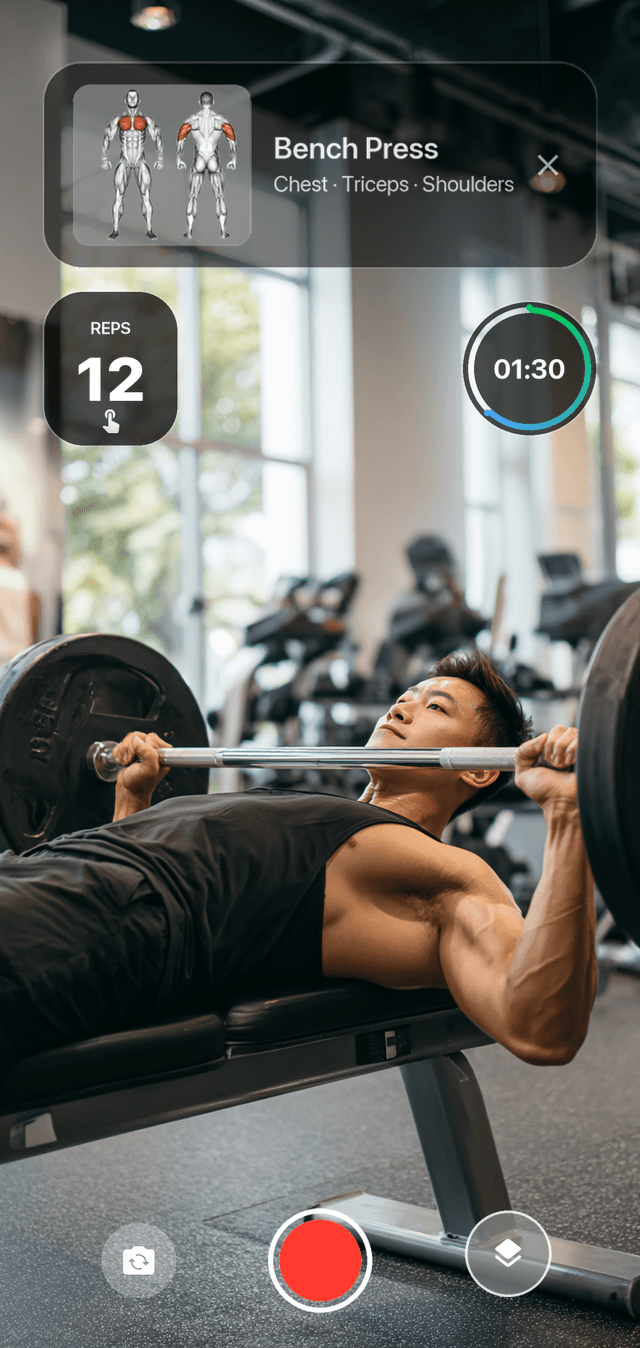
This is exactly what DilFit's workout recording was built for: record your set inside the app and it overlays your real training data live — exercise name, set timer, and heart rate synced from your wearable — in your choice of 10+ overlay styles. The video exports ready to post, no editing pass, and the numbers on screen are the numbers you actually logged.
Posting basics that respect the format
Hook in the first second: start the clip at the walkout or liftoff, not the 40 seconds of setup. Cut rest periods entirely. Natural gym audio outperforms dubbed music more often than you'd expect — the bar hitting the pins is the payoff. And put the numbers in the caption too: "225×5, was 185×5 in March" is a story in nine characters.
Even if you never post: record anyway
Here's the part that has nothing to do with content. Video is the cheapest form coaching available — the set that felt solid often looks different on camera, and depth, bar path, and lockout don't lie. Reviewing your own footage weekly catches form drift before it becomes injury. Your training log tells you what you lifted; the video tells you how. Together they're the complete record of your progress — and on the days motivation dips, scrolling back through months of your own PRs beats any motivational quote.