DilFit vs Hevy: Which Workout Tracker Is Right for You? (2026)
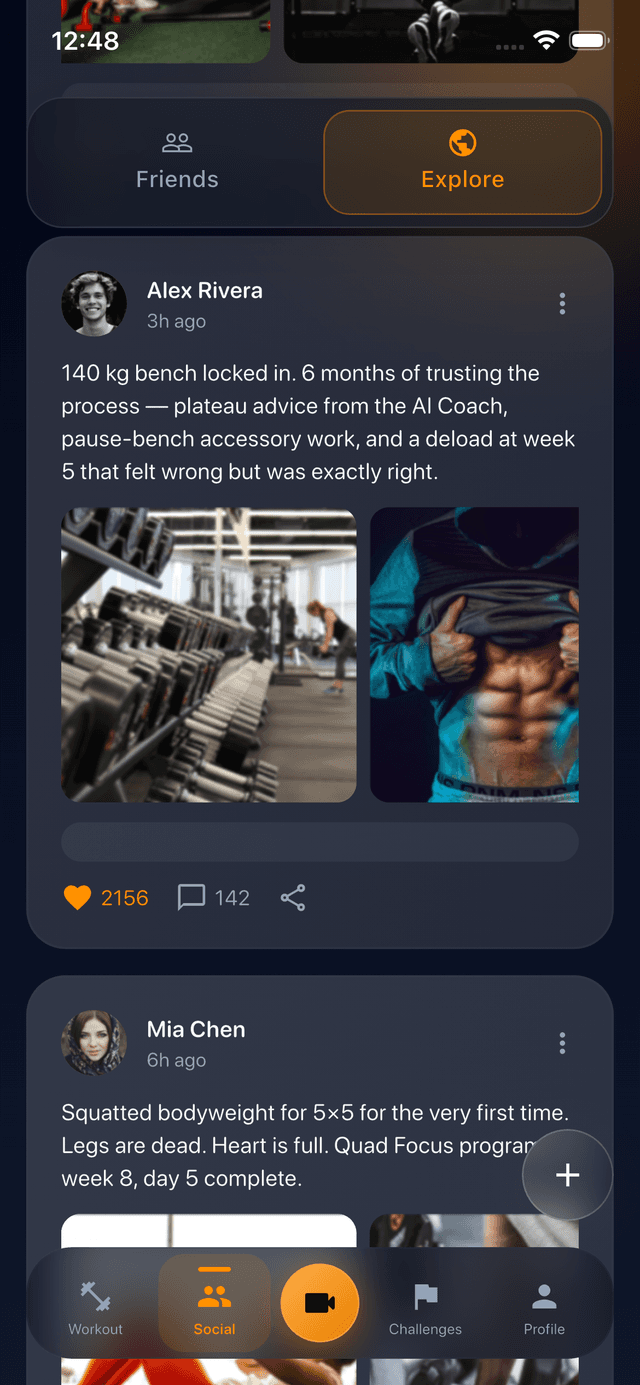
Track this directly in DilFit
DilFit makes logging workout records, monitoring strength metrics, sharing progressive routines, and training alongside partners effortless. Beautiful layouts, custom graphs and full social tracking at your fingertips.
Get App for FreeDilFit and Hevy are both built on the same conviction: a workout tracker works better when your friends are in it. Both give you a clean set-and-rep logger, progress charts, and a social feed where you can follow other lifters. So which one belongs on your home screen?
Full disclosure up front: we make DilFit. So rather than pretend to be neutral, we'll do the next best thing — keep every claim factual, give Hevy credit where it genuinely wins, and let you match each app to how you actually train. Hevy's pricing and free-tier details below are current as of July 2026, taken from Hevy's published pricing; check their site for the latest.
DilFit vs Hevy at a glance
| DilFit | Hevy | |
|---|---|---|
| Price | Free core app; DilFit Pro subscription (monthly or yearly) | Free with limits; Hevy Pro at $2.99/mo, $23.99/yr, or $74.99 lifetime |
| Free tier | Full workout logging, exercise library, social feed, public challenges, and core progress tracking | Full logging, but capped at 4 routines, 7 custom exercises, and 3 months of history |
| Platforms | iPhone | iPhone, Android, Apple Watch, Wear OS, and a web app |
| Social | Feed with workout recaps and PRs, follow friends, discover athletes | Feed with follows and likes, discovery feed, copy friends' routines |
| Challenges | Built-in challenges with live leaderboards, auto-tracked from your workouts; private challenges with Pro | — |
| Video recording | Record sets in-app with live stat overlays (exercise, timer, heart rate from your wearable) | — |
| Programming | Multi-week programs with a drag-and-drop builder; custom plan generation with Pro | Routine builder; Hevy Trainer auto-progression with Pro |
| Analytics | Volume, strength progression, streaks, and weekly frequency; advanced analytics and body measurements with Pro | Progress charts and records; all-time history requires Pro |
Where Hevy wins
1. Platform coverage. Hevy runs on iPhone, Android, Apple Watch, and Wear OS, and has a full web app for reviewing workouts and building routines at your desk. DilFit is currently iPhone-only. If you train on Android or want to log entire sessions from your wrist, Hevy is the practical choice today.
2. A lifetime price option. Hevy Pro costs $2.99/month or $23.99/year, and a one-time $74.99 lifetime license. If subscriptions annoy you on principle, that lifetime option is genuinely rare in this category and worth respecting.
3. Auto-progressing programs. Hevy Trainer, bundled with Pro since early 2026, generates programs and nudges your working weights up automatically based on your recent sets. DilFit Pro offers custom plan generation, but Hevy's session-to-session auto-progression is a polished take on the idea.
Where DilFit wins
1. A free tier built for actually training. Hevy's free plan caps you at 4 routines, 7 custom exercises, and — most importantly — 3 months of workout history. That last one matters more than it sounds: progressive overload means beating your old numbers, and you can't beat numbers you can no longer see. DilFit's free tier keeps full workout logging, the exercise library, the social feed, and public challenges — no routine cap, no history paywall on your core training log.
2. Challenges with real leaderboards. Both apps have a social feed, but a feed is passive — you scroll it. DilFit adds competitive challenges with live leaderboards that update automatically from your logged workouts. Group goals with visible rankings are one of the best-documented motivation tools in exercise psychology, and it's the piece feed-only social layers leave out.
3. Workout video recording. DilFit can record your sets in-app with live overlays — exercise name, timer, and heart rate synced from your wearable — exported ready to post. If you share your lifting on Instagram or TikTok, this replaces a separate camera app and an editing pass. Hevy has nothing comparable.
4. A logger obsessed with progressive overload. DilFit's tracking screen keeps your previous session's weights and reps in view for every set, so the target to beat is always in front of you. It's a small design decision with an outsized effect on long-term progress.
Pricing compared
Both apps are free to download and genuinely usable without paying. Hevy Pro ($2.99/month, $23.99/year, or $74.99 lifetime) removes the routine, custom-exercise, and history caps and adds Hevy Trainer plus a warm-up calculator. DilFit Pro (monthly or yearly through the App Store) adds advanced analytics and body measurements, custom workout plan generation, private challenges, and priority support — while the free tier keeps full logging, the feed, and public challenges. The honest summary: Hevy charges to unlock the tracker itself; DilFit charges for power features on top of a complete free tracker.
Which one should you choose?
Choose Hevy if you train on Android, want a smartwatch-first logging experience, need a desktop web app, or want to pay once and own it forever. It's a mature, well-built tracker with a deserved reputation.
Choose DilFit if you're on iPhone and the social side is the point — you want challenges and leaderboards with your gym crew rather than just a feed, you record your lifts for social media, or you want your full training history and logging free from day one.
The good news: both are free to try, so the real test costs nothing. Log the same week of workouts in each and see which one you reach for on day eight. If that week convinces you that training is better with a squad, DilFit is waiting on the App Store.