The 6 Best Workout Overlay Apps for Fitness Creators (2026)
Track this directly in DilFit
DilFit makes logging workout records, monitoring strength metrics, sharing progressive routines, and training alongside partners effortless. Beautiful layouts, custom graphs and full social tracking at your fingertips.
Get App for FreeStat overlays are the visual language of fitness content in 2026: weight, reps, a timer, a heart rate — real data on top of real footage. Viewers trust numbers recorded with the lift more than captions typed afterward, and creators have noticed. But 'overlay app' covers two different species: apps that draw stats live while you record, and apps that process your footage after the fact. Picking the wrong one for your use case wastes both time and money.
Quick disclosure: we make DilFit, which sits at the top of this list — so we'll hold every entry to the same standard as our comparison posts: factual claims, honest credit to the alternatives, and a table so you can decide fast. Details are current as of July 2026; check each app's page for the latest.
1. DilFit — live stats while you lift
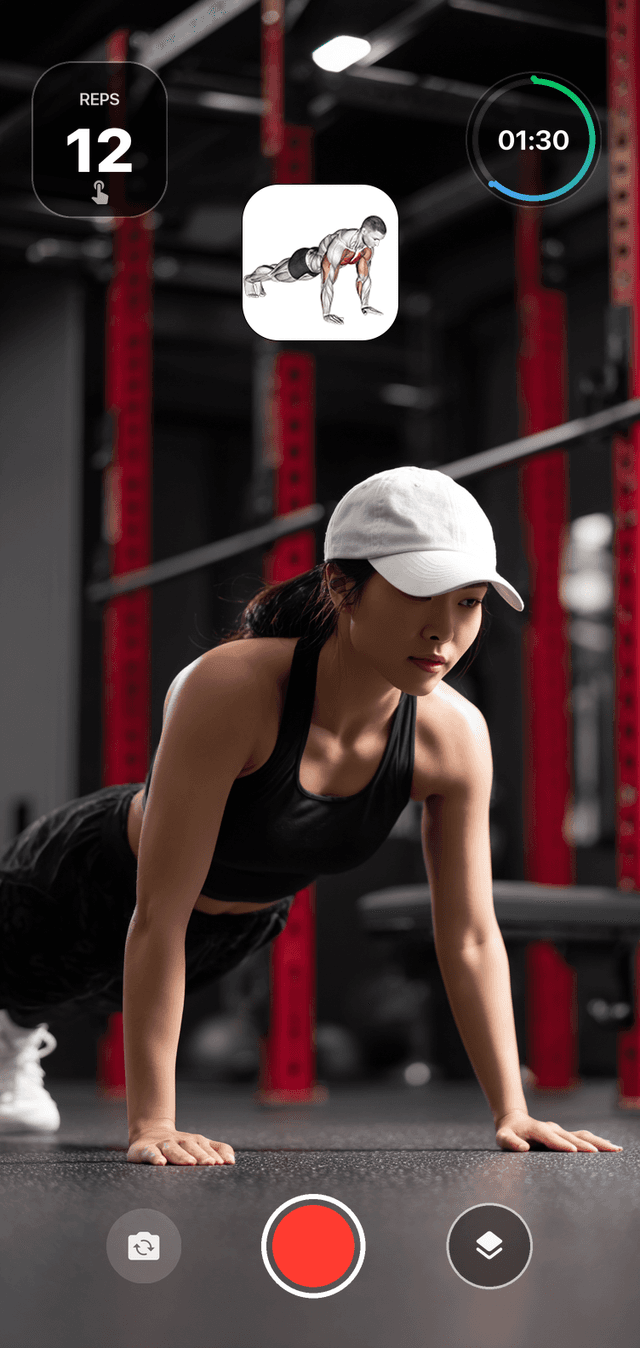
DilFit is a social workout tracker with a video recorder built into the workout itself. Start a session, pick your exercise, and hit record: the overlay shows the exercise name and target muscles automatically, runs a set timer, counts reps as you tap, and streams live heart rate from your connected wearable — in your choice of 10+ overlay styles. The clip saves ready to post to TikTok, Reels, or Shorts, with no editing pass and no typing your numbers from memory.
What separates it from everything else here is context. Because the recorder lives inside a real tracker, the overlay knows what you're lifting — and the set you film belongs to the same training log, feed, and challenges as everything else you do. The honest limits: it's iPhone-only, and it's a lifting app first; if your content is trail runs, look at FitCam and Quik below. The core app, recording included, is free.
2. FitCam — Apple Watch metrics on your camera
FitCam is a camera app purpose-built for filming workouts with live metrics streamed from your Apple Watch — heart rate, zones, pace, and distance — with overlay styles for running, cycling, strength, and yoga. If your content is cardio, where pace and heart rate are the story, it's the most polished live-overlay camera out there. The trade-off: FitCam is a camera, not a tracker. It doesn't know what exercise you're doing, can't show sets and reps with real context, and the footage connects to no training log. For runners that hardly matters; for lifters, it's exactly the gap DilFit fills.
3. WL Analysis — bar path and velocity, drawn afterward
WL Analysis takes a video of your barbell lift and traces the bar path onto it, color-coded by velocity, power, or force, with frame-by-frame playback and side-by-side comparisons. It's post-processing rather than live overlay, and it's built for technique analysis more than content — but an exported clip with a glowing velocity-colored bar path is genuinely striking on a feed. There's a free version, and the paid tier has been a modest one-time purchase rather than a subscription, which is refreshing in this category.
4. Metric — VBT-grade tracking with video export
Metric aims the same idea at coaches: velocity-based training from a smartphone camera, with bar path and velocity metrics rendered onto exportable video. Smartphone VBT tools of this generation have been tested in peer-reviewed validation studies against lab-grade equipment, so the numbers on screen are more than decoration. If you coach lifters remotely or your content leans educational, this is the analytical pick.
5. GoPro Quik — telemetry gauges for outdoor training
If your training happens on roads and trails, Quik overlays speed, GPS route, elevation, and heart rate from paired sensors as animated gauges on GoPro footage. It's the established choice for endurance and action-sport content — with the obvious catch that it wants GoPro footage, so this is an ecosystem decision, not just an app download.
6. CapCut — the manual fallback
CapCut is where most fitness creators start: film in the camera app, add text boxes for weight and reps by hand, animate them, export. It's free, endlessly flexible, and full of templates. The costs are time — 30 to 45 minutes per clip done properly — and credibility, since every number is typed from memory after the fact. Keep it installed for the one-off edit that really matters; retire it as your daily workflow.
All six at a glance
| App | Overlay timing | What it shows | Best for |
|---|---|---|---|
| DilFit | Live, while you record | Exercise, reps, set timer, wearable heart rate | Lifters who post their training |
| FitCam | Live, while you record | Heart rate, zones, pace, distance from Apple Watch | Cardio and conditioning content |
| WL Analysis | After, in processing | Bar path colored by velocity, power, or force | Barbell technique review |
| Metric | After, in processing | Bar path and velocity metrics on exported video | Coaches and velocity-based training |
| GoPro Quik | After, in processing | Speed, GPS route, elevation, sensor heart rate | Outdoor training on a GoPro |
| CapCut | Manual, added by hand | Anything you type | One-off edits with full control |
Which one should you get?
If you lift and you post: DilFit — it's the only option where the stats are live, real, and attached to an actual training log. If your content is runs, rides, or conditioning: FitCam with an Apple Watch, or Quik if you already carry a GoPro. If you care about technique as much as content: WL Analysis for yourself, Metric if you coach. And whichever you pick, our guide to recording gym workouts covers the camera angles and gym etiquette that no app solves for you.
Most of these are free to try — DilFit's recorder included. Film one set this week with the option that fits your training and see if the clip that comes out is something you'd post. If it is, you've just deleted the editing step from your workflow for good.